Should you choose Mosaik or HabitKit?
We make Mosaik, so read this with that in mind. We’ve tried to be fair: HabitKit is a well-made app, and for some people it’s the better choice.
- Choose HabitKit if you use Android, if you want the simplest possible tile grid, if you want four free habits instead of three, or if price matters most.
- Choose Mosaik if you’re on iPhone and want a gentler take on missed days, a 66-day picture to work towards, habit chains with nudges, goals and challenges, or Apple Health auto-tracking and a weekly AI coach with Plus.
How do Mosaik and HabitKit compare?
| Feature | HabitKit | Mosaik |
|---|---|---|
| Platforms | iPhone, iPad and Android | iPhone only (Android coming soon) |
| Free plan | Up to 4 habits, with streaks, statistics, notes and reminders | Up to 3 habits, with the grid and year history, canvas, goals, challenges, journal and reminders |
| Paid plan | HabitKit Pro: about $1.99/month, $11.99/year or $29.99 lifetime (US) | Mosaik Plus: €4.99/month, €24.99/year with a 7-day free trial, or €44.99 lifetime |
| Missed day | Shows as an empty tile; the streak counts days in a row | Shows as a quieter piece; nothing resets, daily habits get a grace day |
| 66-day canvas | No; a tile grid per habit | Yes: each full day adds sea glass to a hidden picture |
| AI coach | Not mentioned in its listing | Weekly AI coach (Plus) |
| Apple Health | Not mentioned in its listing | Auto-tracking of steps, sleep, water and more, read-only (Plus) |
| Widgets | Home Screen widgets (Pro) | Home and Lock Screen widgets; every size with Plus |
| Habit stacking | Not mentioned in its listing | Habit chains with a nudge when the first is done (free) |
| Account needed | No | No |
| Backup and sync | Export and import backups (Pro) | Encrypted sync across devices and CSV export (Plus) |
| Languages | 17 | 5, including German, Spanish and French |
What do Mosaik and HabitKit have in common?
More than you might expect. Both are:
- Made by independent developers. HabitKit by Sebastian Roehl, Mosaik by Front Tribe in Croatia.
- Built around seeing your days. Each habit gets a grid of squares, one per day, that fills in as you go.
- Private by default. No account needed, and your habits stay on your device unless you choose otherwise.
- Flexible about what a habit is. Yes/no habits, counts like glasses of water, and habits that happen a few times a week.
- Free to start, with a monthly, yearly or one-time lifetime upgrade.
Where is HabitKit better?
- Android. HabitKit is on Google Play as well as the App Store. Mosaik isn’t on Android yet.
- Price. HabitKit Pro costs less than Mosaik Plus on every plan.
- A slightly bigger free plan. Four habits instead of three.
- Quitting habits. HabitKit has a mode for habits you’re breaking, where every day counts as clean until you log a slip, and daily maximums like “two coffees a day”.
- Simplicity and a track record. It does one thing, the tile grid, and does it well. It’s an established app, with about 2,400 ratings averaging 4.8 on the US App Store (September 2026). Mosaik is new.
- More languages: 17, against Mosaik’s 5.
Where is Mosaik better?
- A picture to work towards. Each full day of habits adds a piece of sea glass to a hidden 66-day picture, based on research into how long habits take.
- More structure around the habits. Goals that group habits under a target, 30-, 60- and 90-day challenges, a Momentum score, and 21 milestones, all on the free plan.
- Habit chains. Set a habit to follow another and Mosaik nudges you when the first one is done. More on habit stacking.
- Room for real life. Breaks for holidays and illness, easy days for heavy ones, and a journal for a note, mood and energy.
- Habits that track themselves (Plus). With your permission, Apple Health checks off steps, sleep, water and mindful minutes. Read-only.
- A weekly AI coach (Plus): a short read on what’s working and one thing to focus on.
- Sync and a year recap (Plus): encrypted sync across devices, and a Year in Pixels card of all your habits.
- Siri and a free widget. Log a habit by voice, and use a Mosaik widget on the Home or Lock Screen without paying.
What happens when you miss a day?
This is the biggest difference in feel. In HabitKit, a missed day is an empty square in the grid, and your streak counts completed days in a row. It’s honest and simple, and plenty of people like the push to protect a streak.
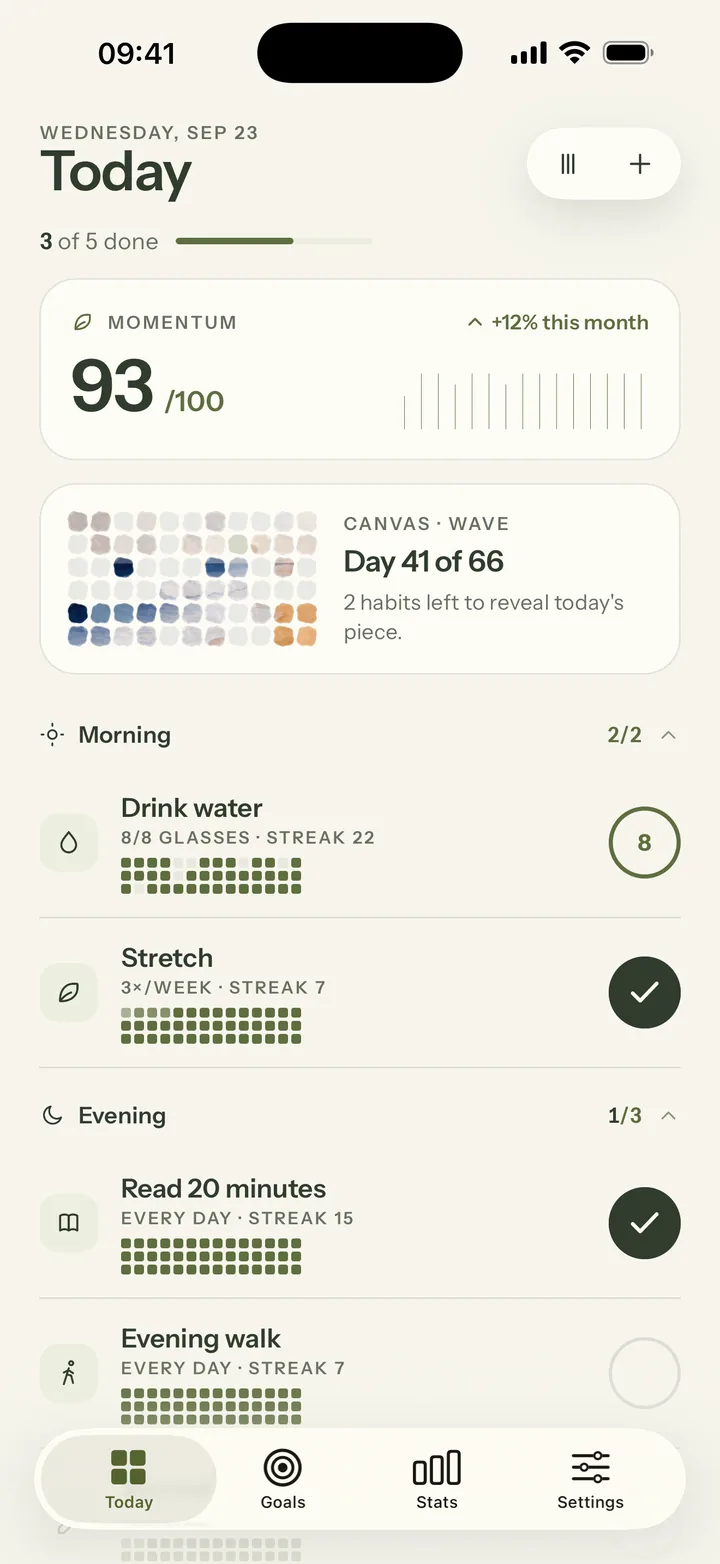
We built it that way because the research is on the side of carrying on: in a 2010 study, missing a single day didn’t materially affect how quickly a habit became automatic. If an all-or-nothing streak tends to make you give up after one bad day, Mosaik may suit you better.
Which habit tracker should you choose?
- You’re on Android, or switch between Android and iPhone: HabitKit.
- You want the cheapest paid plan: HabitKit.
- You want to quit a habit, with clean-day counting: HabitKit.
- You want a gentler approach to missed days and something to look forward to: Mosaik.
- You want Apple Health auto-tracking, habit chains or an AI coach: Mosaik.
- You’re not sure: both have free plans. Try each for a week with the same three habits and keep the one you open without thinking.
HabitKit is a trademark of its owner. Mosaik is not affiliated with or endorsed by HabitKit. Details come from HabitKit’s App Store listing and website, checked September 2026; if something has changed, let us know at hello@themosaik.app.
Frequently asked questions
Is HabitKit free?
Yes, for up to 4 habits, with streaks, statistics, notes and reminders. HabitKit Pro unlocks unlimited habits, Home Screen widgets, import and export backups, restoring archived habits and up to three reminders per habit. Mosaik is free for up to 3 habits.
Is HabitKit available on Android?
Yes. HabitKit is on the App Store and Google Play. Mosaik is iPhone only for now; an Android version is coming soon but isn’t available yet. If you need Android today, HabitKit is the better choice.
What is a good HabitKit alternative for iPhone?
It depends on what you want to change. If you like HabitKit’s grids but want missed days to feel gentler, a 66-day picture to work towards, Apple Health auto-tracking or a weekly AI coach, Mosaik is worth a try. If you want an even simpler grid, HabitKit itself is hard to beat.
Does Mosaik have a grid like HabitKit?
Yes. Every habit in Mosaik has its own grid and a full-year history, one square per day, and the Today screen shows a small grid under each habit. On top of that, each full day adds a piece of sea glass to a 66-day canvas.
Which is cheaper, HabitKit or Mosaik?
HabitKit. On the US App Store in September 2026, HabitKit Pro is listed at about $1.99 a month, $11.99 a year or $29.99 for life. Mosaik Plus is €4.99 a month, €24.99 a year with a 7-day free trial, or €44.99 once. Both have a free plan.
Do HabitKit or Mosaik need an account?
Neither does. Both keep your habits on your device by default. HabitKit Pro can export and import backups; Mosaik Plus adds optional encrypted sync across devices and CSV export.